How I SSH Into My AI Lab and Use Claude Code From the Command Line

This post is part of an ongoing series on AI memory and context management — how to give Claude persistent, structured knowledge of your projects across sessions, devices, and interfaces. This installment covers the foundation: SSH into a remote server, run Claude Code, and use plain markdown files to keep context alive across every session. Later posts go deeper into the file system itself, how it compares to Claude's built-in memory, and how to extend it to the cloud so every interface — CLI, browser, mobile — reads from the same source.
It's 9pm. I open a terminal, type ssh ailab, and I'm on a server in a DigitalOcean data center. I cd into a project directory, type claude, and within seconds I'm in a session where Claude already knows what I was building last night, what's left to do, and how I want it to work.
No context pasted. No re-explaining. Just work.
But this post isn't really about SSH. SSH is just the door.
What's behind it is a file-based context system I've built on top of Claude Code — plain markdown files living on the server filesystem, version-controlled in git, that give Claude a persistent, structured understanding of my projects across every session. My sprint board. My behavioral rules. The live state of every service I'm running. What decisions I've made and what I've decided not to do.
Claude's built-in memory handles preferences. This handles everything else — and it does it in a way I fully control, can diff, can roll back, and can read without an AI in the room.
This post covers the full setup: the SSH config, the directory structure, the files that carry context, the stop hook that enforces the discipline to maintain them, and the scrum-style sprint system I use to track work across sessions the same way I run engineering teams at my day job.
Why a remote VPS instead of local
I covered the full reasoning in the VPS setup post, but the short version: I wanted one environment that behaves identically everywhere.
I work on a Mac Mini M4 at my desk. Sometimes I'm somewhere else. If Claude Code and all its project context lives on my local machine, I'm either locked to that machine or constantly managing sync.
A VPS solves it by being the single source of truth. SSH in from anywhere — same files, same history, same state. Nothing to sync because there's only one place.
The secondary benefit: keeping dev environment dependencies off my local machine entirely. The VPS has the Node versions, the Python environments, the Docker containers, the running services. My Mac is just a terminal window pointed at the server.
The setup
Server: DigitalOcean Droplet, Ubuntu 24.04, 2 vCPU, 4GB RAM. Hostname ailab, IP xxx.xx.xx.xxx. Password auth disabled — SSH key only.
SSH key (generated once, deployed to DigitalOcean and GitHub):
ssh-keygen -t ed25519 -f ~/.ssh/agnx_do -C "agnx-macmini"
SSH config (~/.ssh/config on the Mac):
Host ailab
  HostName xxx.xx.xx.xxx
  User rj
  IdentityFile ~/.ssh/agnx_do
From the Mac terminal:
ssh ailab
One command. On the server. From anywhere with the key.
Claude Code installed globally on the VPS:
npm install -g @anthropic/claude-code
claude is now available in every SSH session. The working directory determines which project context loads — more on that below.
Two ways in: terminal and VS Code Remote SSH
I use both depending on what I'm doing.
Terminal only — for Claude conversations, quick edits, git operations, running services. Fast, low overhead. This is the default.
VS Code Remote SSH — when I need to browse files visually, edit multiple files at once, or review diffs. The VS Code Remote SSH extension connects directly to ailab over the same SSH config. Once connected, VS Code's integrated terminal runs on the server — so claude works there too.
# VS Code: Cmd+Shift+P → Remote-SSH: Connect to Host → ailab
Both interfaces share the same filesystem, same running processes, same Claude Code installation. Switching between them mid-session is seamless.
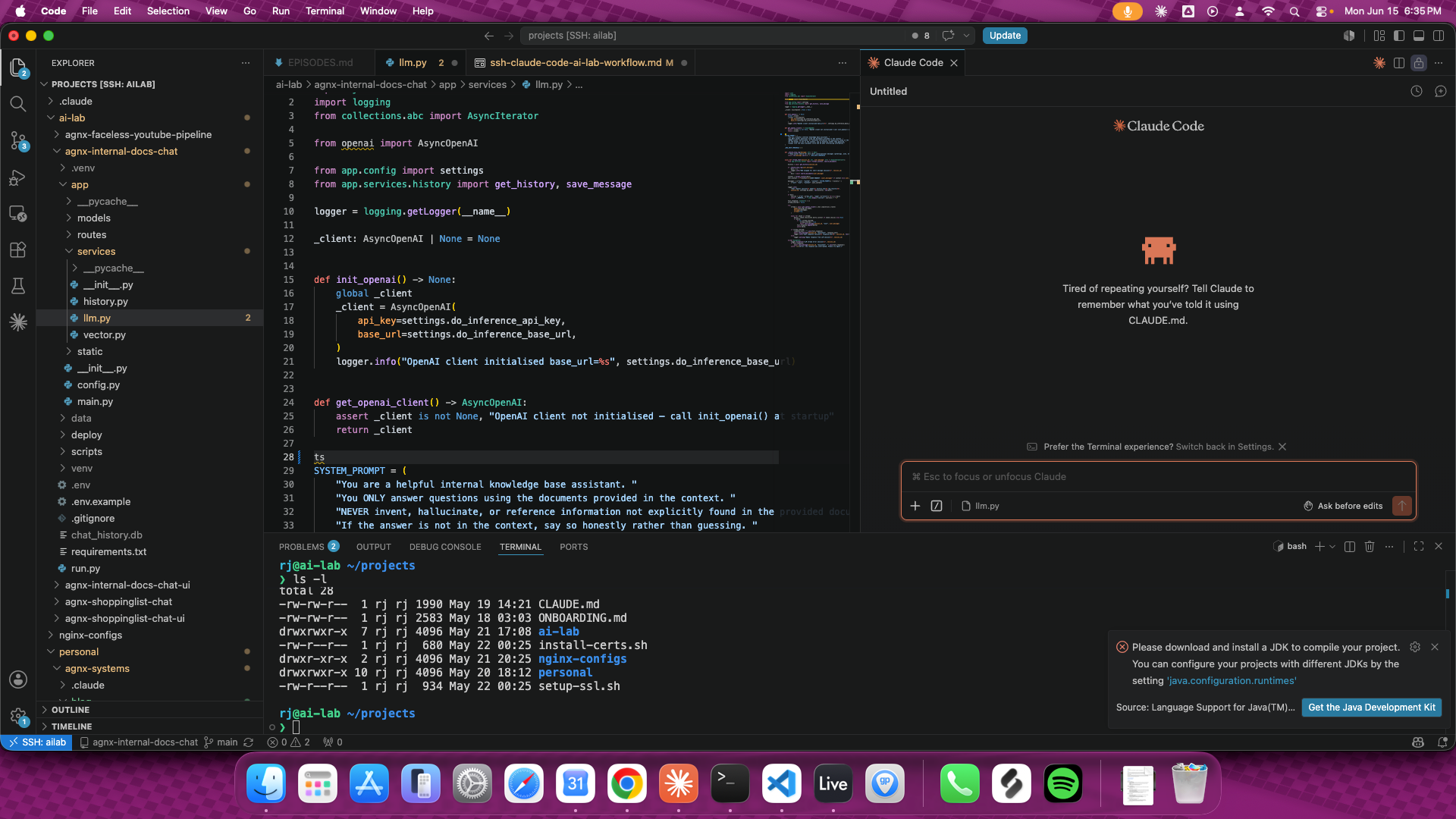
VS Code Remote SSH connected to ailab — the explorer panel shows the VPS filesystem directly, and the integrated terminal runs Claude Code on the server.
The project structure
Everything lives under ~/projects. This is the real structure on the server:
~/projects/
  CLAUDE.md                        — workspace-level rules, session conventions
  ONBOARDING.md                    — new project onboarding checklist
  .claude/
    settings.json                  — hooks, permissions, Claude Code config
    settings.local.json

  personal/
    agency/                        — freelance agency home base
      CLAUDE.md                    — business rules, goals, behavioral constraints
      CONTEXT.md                   — living state log, updated every session
      TASKS.md                     — sprint task board, quarterly targets
      coding.md                    — coding standards
      blog/
        posts/                     — draft markdown files
        publish.js                 — CMS publishing script
      journal/                     — daily entries
      review/
        _templates/                — weekly, monthly, quarterly review templates
      planning/
        roadmap.md
        build-log.md
        agent-architecture.md
        sop-n8n-automation.md
        sop-make-automation.md
        pricing-strategy.md
      ideation/
        inbox.md                   — raw idea capture
        reviewed.md                — evaluated ideas
      finance/
      prompts/
        claude/                    — reusable Claude prompts
        system-prompts/            — agent system prompts (lead scoring, etc.)
        image/ video/ voice/       — AI generation prompts
      demo-assets/
        lead-qualification-agent/
        make-automation-demo/

  ai-lab/                          — active project repos
    rag-product-chatbot/           — RAG backend (FastAPI, Qdrant)
    rag-product-chatbot-ui/        — frontend (Next.js, Clerk, Stripe)
    internal-docs-chatbot/         — knowledge base backend
    internal-docs-chatbot-ui/      — knowledge base frontend
    content-pipeline/
      STEPS.md                     — production workflow
      MASTER_PROMPTS.md            — global style guide
      PIPELINE.md                  — content schedule and episode map
      episodes/                    — per-episode scripts and assets
The key file is CLAUDE.md. Claude Code automatically loads the nearest CLAUDE.md when a session starts — the one in the current directory, or the closest parent. Context is scoped by where you cd.
Open a session in ~/projects/personal/agnx-systems and Claude loads the business rules, current sprint goals, stack details, and behavioral constraints defined in that directory's CLAUDE.md. Open one in ~/projects/ai-lab/agnx-shoppinglist-chat and it loads the technical context for that project instead.
No preamble required. No "here's what we're working on." It's already there.
What goes in CLAUDE.md
CLAUDE.md is the static layer — things that don't change session to session. Here's the kind of content mine holds for the business project:
# AI Agency — Home Base

## Context
- Senior software engineer, full-time day job
- ~2 hours/night + weekends available for side work
- Goal: build a freelance AI dev practice, reach financial independence

## Behavioral Rules
- Be direct. No fluff or preamble.
- Default to revenue-first thinking.
- Call out overbuilding and scope creep immediately.
- Ask "does this move a client closer to paying?" before endorsing new work.
- Speed of execution beats quality of plan.

## Current Quarter Goal
Land first 3 paying clients across 2 service lines.
No productizing until freelance income is consistent.

## Stack
- Backend: FastAPI (Python), Java / Spring Boot
- AI: LangChain, OpenAI API, Claude
- Frontend: React / Next.js, Clerk, Stripe
- Infra: DigitalOcean VPS, nginx, acme.sh SSL, systemd services
This is the frame. Claude reads it at session start and operates within it for the entire conversation. I don't re-state goals. I don't re-explain the stack. I just work.
The markdown file system: a quick orientation
Claude Code automatically loads CLAUDE.md from your working directory at session start. That's a first-class feature — the file is read before your first message, which means Claude enters every session already knowing your rules, your stack, and your goals. But CLAUDE.md is static. It's the frame, not the memory.
The memory lives in two other files. CONTEXT.md is the live state of the project — what's in progress, what just shipped, what the current blockers are, what changed in the last session. It gets updated every time a session ends. TASKS.md is the sprint board — quarterly targets, active sprint, every task with a priority and a point estimate. Between the three files, Claude opens each session with the same working knowledge I have: what we're building, where we left off, and what's next.
The reason this works better than relying on Claude's built-in memory for project state is control. These files are version-controlled, diffable, and readable without an AI in the room. I decide exactly what Claude knows and in what form. Nothing gets auto-summarized into something I didn't write.
Part 2 of this series breaks down each file in full — what goes in, what stays out, real examples from active sessions, and a starter template you can drop into any project.
How context persists between sessions
As covered above, Claude's memory feature handles your personal preferences globally — but project state is a different problem. Which sprint you're in, what deployed last night, what the current blockers are — none of that lives in Claude's memory. It lives in files.
Two files carry that state:
CLAUDE.md — static context. Who I am, what the project is, what the rules are, what the stack looks like. Updated rarely. This is the frame.
CONTEXT.md — dynamic state. What's in progress, what shipped, what's next, current blockers, what changed today. Updated every session. This is the memory.
A stripped-down example of CONTEXT.md:
# Project Context
Last Updated: 2026-06-12

## Current Sprint (S6, Jun 10–30)
- DONE: n8n lead agent built + prod-hardened, Make.com version built,
  both gig demo videos recorded, Gig 3 + Gig 4 posted live Jun 12
- TODO: off-Fiverr outreach (Reddit, Facebook, X)

## Active Services
- petpal-api — systemd service, port 8000, ENV=prod
- petpal-ui — systemd service, port 3000
- docubot-api — systemd service, port 8001
- docubot-ui — systemd service, port 3001
- n8n — Docker container, port 5678

## Blockers
- None

## What's Next
- Off-Fiverr outreach starts Jun 15
- Q2 review Jun 30
When a new session opens, Claude reads both files. It knows what sprint we're in, what's done, what's in progress, what the services look like, what not to do. The session starts informed, not blank.
The stop hook: enforcing the discipline
The system only works if CONTEXT.md actually gets updated. Left to its own, that discipline erodes — sessions end, you close the terminal, you forget.
Claude Code supports hooks — shell commands that fire at specific lifecycle events. I use the Stop hook to enforce the update:
~/.claude/settings.json:
{
  "hooks": {
    "Stop": [
      {
        "matcher": "",
        "hooks": [
          {
            "type": "command",
            "command": "echo '\\n⚠️  Session ending. Update CONTEXT.md before closing.\\n'"
          }
        ]
      }
    ]
  }
}
Every time a Claude Code session ends, the terminal prints a reminder. It takes two minutes to update the file. Without that prompt, I'd skip it half the time.
After updating, I commit and push:
git add CONTEXT.md TASKS.md
git commit -m "checkpoint: update context after session"
git push origin main
The state is in version control. The next session pulls it automatically on a fresh checkout, or it's already there if I'm on the same VPS.
There's a secondary benefit worth naming: every checkpoint is a commit, so you get a free audit trail of every session's decisions without maintaining a separate log. You can git log the context files and see exactly where the project was at any point — what was in progress, what just shipped, what the blockers were. It's a project journal baked into version control.
Cross-device workflow in practice
Here's what a typical evening session looks like from end to end:
# Mac terminal
ssh ailab

# navigate to project — CLAUDE.md loads automatically
cd ~/projects/personal/agnx-systems

# start Claude Code
claude
Claude opens with full context. I ask it to pull up the current sprint status, or just start giving it tasks. It knows the rules, the stack, what shipped last session, what's next.
When I'm done:
# stop hook fires, reminder prints
# update CONTEXT.md with what changed
# commit
git add CONTEXT.md TASKS.md
git commit -m "checkpoint"
git push
Next session — same machine, different machine, doesn't matter — picks up exactly here.
Tracking quarterly goals: the sprint system
CONTEXT.md handles session-to-session memory. But for tracking a quarter of work — goals, sprints, what shipped, what didn't — I use TASKS.md.
I'm a senior software engineer by day, and the scrum methodology is how I think about project work. Sprints, story points, backlog grooming, ceremonies — I use the same structure on my side business that my teams use at work. It made sense to bring it into the AI workflow rather than invent something new. The tooling is different (markdown files instead of Jira), but the mental model is identical.
The structure mirrors how an engineering team runs sprints, applied to a solo side business:
## Q2 TARGET
4 gigs live (incl. 2 AI automation) · 3–5 paying customers
$1,000–$2,000 revenue · Identify 1 niche worth productizing

## Sprint Structure — Q2 2026
| Sprint | Dates          | Status      |
|--------|----------------|-------------|
| 1–3    | Apr 1–May 12   | DONE        |
| 4      | May 13–May 26  | DONE        |
| 5      | May 27–Jun 9   | DONE        |
| 6      | Jun 10–Jun 30  | ACTIVE      |

## Sizing Guide
1pt = < 1 hr       (quick win)
2pt = 1–2 hrs      (one session)
3pt = 3–4 hrs      (a couple sessions)
5pt = ~half day    (weekend morning)
8pt = ~full day    (break down before pulling in)

## Status Guide
TODO        — not started, in current sprint
IN PROGRESS — actively being worked
BLOCKED     — waiting on something external
DONE        — complete
ON HOLD     — intentionally paused, not abandoned
CARRY OVER  — didn't finish this sprint, moves to next
Every task has a priority, a point estimate, and a status. Nothing enters a sprint without an estimate. The rule is simple and it matters — unestimated tasks are wishes, not commitments.
The full status command
Rather than eyeballing the markdown, I ask Claude to render a structured status view. The format is defined directly in CLAUDE.md so it's consistent across every session:
## Full Status Format

When "full status" is requested, output in this exact structure:
1. ## Full Status — [Date]
2. Q2 Goal — one-liner
3. Fiverr table — box-drawing ASCII, columns: Gig | Status
4. All sprints — header with point totals, then task table
5. Backlog — item count
6. Blog Publishing Queue
7. Blockers

Rules:
- Use box-drawing ASCII tables (┌┬┐├┼┤└┴┘─│) — NOT markdown tables
- Every task row individually bordered
- Always re-read TASKS.md to derive point totals — never use cached values
Typing full status in any session produces something like this:
## Full Status — Jun 15, 2026

Q2 Goal: 4 gigs live, 3–5 customers, $1,000–$2,000 revenue.
No SaaS until Fiverr generating income.

┌──────────────────────────────────────────┬──────────────────────┐
│ Gig                                      │ Status               │
├──────────────────────────────────────────┼──────────────────────┤
│ Gig 1 — RAG Chatbot ($100/$400/$1,200)   │ LIVE · 0 orders      │
├──────────────────────────────────────────┼──────────────────────┤
│ Gig 2 — KB Chatbot ($100/$400/$1,200)    │ LIVE · 0 orders      │
├──────────────────────────────────────────┼──────────────────────┤
│ Gig 3 — n8n AI Agent ($100/$350/$750)    │ LIVE Jun 12 · 0 orders│
├──────────────────────────────────────────┼──────────────────────┤
│ Gig 4 — Make.com Agent ($75/$250/$600)   │ LIVE Jun 12 · 0 orders│
└──────────────────────────────────────────┴──────────────────────┘

Sprint 6 (Jun 10–30) — ACTIVE · 15 days left · 28pt total · 23pt done

┌──────────────────────────────────────────────────┬─────┬──────┬─────────────┐
│ Task                                             │ P   │ Pts  │ Status      │
├──────────────────────────────────────────────────┼─────┼──────┼─────────────┤
│ Build agent — webhook + Apollo enrichment        │ P1  │ 2pt  │ DONE        │
├──────────────────────────────────────────────────┼─────┼──────┼─────────────┤
│ ...                                              │     │      │             │
├──────────────────────────────────────────────────┼─────┼──────┼─────────────┤
│ Off-Fiverr outreach — Reddit, Facebook, X        │ P1  │ 2pt  │ TODO        │
└──────────────────────────────────────────────────┴─────┴──────┴─────────────┘
23pt DONE · 5pt TODO
The format is defined once in CLAUDE.md and never drifts. Any session, on any device, produces the same output because Claude is reading the same format spec from the same file.
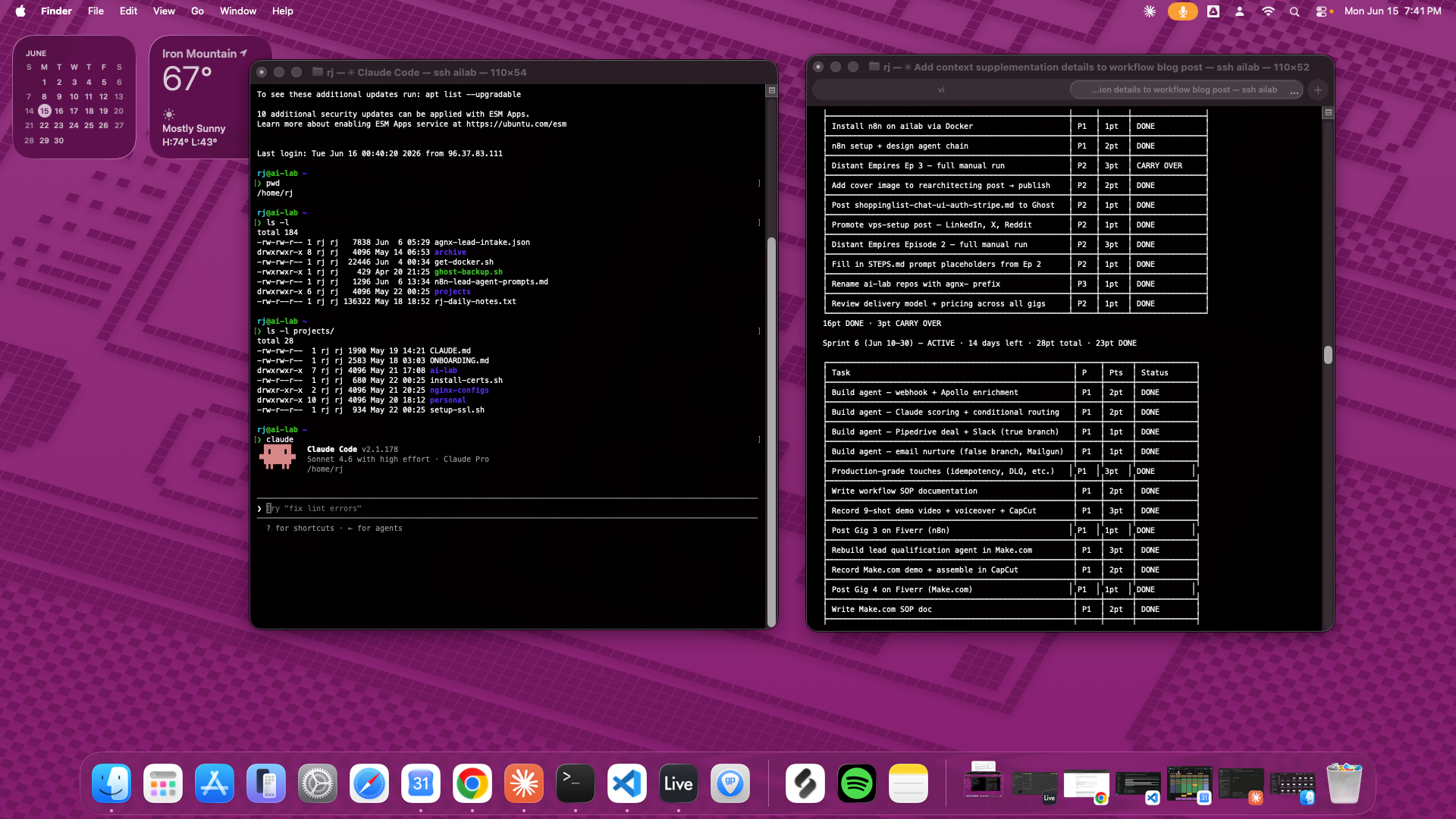
Two terminal windows connected to ailab — one running full status, pulling the live sprint board directly from TASKS.md.
This is what I mean when I say the system is about files, not AI memory. The AI is the renderer. The files are the source of truth.
What this doesn't solve
Browser Claude.ai can't see any of this. The markdown files are on the VPS filesystem. Claude.ai has its own project memory and attached files, but they're separate from the CLI context. Right now I bridge that manually when needed — copy-pasting relevant context into a browser session.
A cleaner solution is a Google Drive MCP that syncs CONTEXT.md to Drive, making it readable by both the CLI and browser Claude from the same source. That's still on the backlog.
tmux is worth adding. Long-running sessions survive SSH disconnects in tmux. If a session gets cut mid-task, reconnect and re-attach — everything is still there. I have tmux on both machines but don't use it as consistently as I should.
The underlying principle
The context system isn't clever. It's markdown files in a directory, a naming convention, and a stop hook. The power comes from the discipline to maintain them and the habit of always opening sessions in the right directory.
What it buys: any session, on any device, has full context from the first message. No ramp-up. No re-explaining. No stale assumptions. The AI has the same working memory I do — because both are reading the same files.
For a solo developer working in short evening sessions across multiple devices and contexts, that's the whole game.
This post is part of an ongoing series on AI memory and context management — how to give Claude persistent, structured knowledge of your projects across sessions, devices, and interfaces.
Previous: Setting Up a DigitalOcean VPS for Remote Development · Next: How I Use Markdown Files to Give Claude Code a Perfect Memory — and Sync It Everywhere (coming soon)